Showing posts with label microbit. Show all posts

Wednesday, January 25, 2023

How I introduce Microbits?

 I was recently asked how I introduce a new technology like micro:bits to student, so I thought I might write a blog post with some of my thoughts about this.  


What is the micro:bit you ask? 
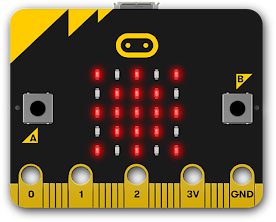

officialmicrobit image
The BBC micro:bit is an inexpensive electronic circuit board designed for students to learn electronics and coding. It includes buttons and lights and sensors that lend themselves to creating amazing interactive projects. When a student connects the micro:bit to a computer with a USB cable, they can quickly program the board with new interactions using beginner-friendly code environments, such as Microsoft MakeCode.

Over the past few years, we’ve watched the popularity of micro:bit skyrocket in our educator community. The board’s rugged, yet friendly design holds up to repeated use and the curriculum developed by the Micro:bit Educational Foundation is top-notch and easy to implement.


 I've recently created this graphic to capture my pedagogical approach to learning through creating and making.  The framework has evolved from personal experience with teaching and learning and from the opportunity to learn with and from talented educators over the years. 


The INSPIRE phase is a time to explore something in a way that motivates the learner to create and make something meaningful. It is based on the belief that MOTIVATION is the foundation of all meaningful learning. There are several ways to create an activity that INSPIRES or motivates.   


One way that I introduce the micro:bit is by having students engage in a few rounds of Rock Paper Scissors.  This gets the whole class warmed up and thinking about fun.  It is a game that most learners are already familiar with so it connects to prior knowledge. 


Then I tell them that they are going to learn to create a fun wearable that can be used to play Rock Paper Scissors. 


Once a student is inspired, it is helpful to take some time to create confidence with new tools and processes.  I like to design some skill building sprints to build student confidence with a new tool or skill.


I love to introduce the micro:bit by teaching students how to create a Rock Paper Scissor bracelet.  
Not only does this activity lend itself well to learning to code and transfer data from your computer to the microbit, it also includes an opportunity for creativity in the way you design the bracelet.


I'll never forget the enthusiasm in one fifth grade students who approached me after class and said.  "That was hard.  It made my brain hurt. But I MADE A WEARABLE.  I can't wait to tell my mom." 

I especially like designing activities that lend themselves to cross-curricular integration.   I've picked up a few different books related to Rock Paper Scissors for students to dive into as well as a few web sites like this BBC News article: How to win at rock-paper-scissors

Here are just a few options for curricular integration.


During the Create Confidence phase,  I like to teach students how to learn on their own using the MAKE CODE tutorials. 
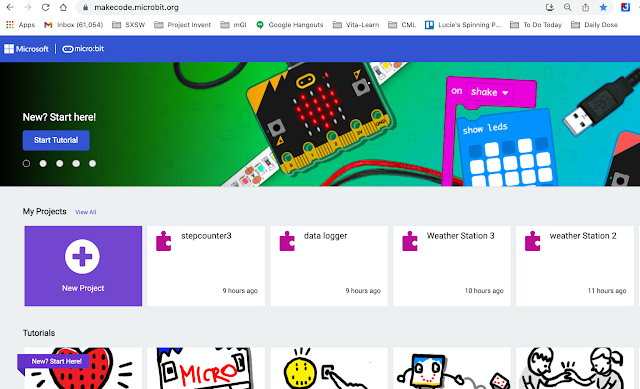


I encourage students to go through the DICE tutorial as it has so much potential for enrichment and expansion.  Once they understand how to navigate the various resources at their finger tips, they can  continue to grow their confidence on their own. 


Once students are starting to feel some creative confidence, it is time to challenge them to apply their skills and  MAKE SOMETHING MEANINGFUL. This can take on several forms.  I often refer to this list from a respected colleague, Michael Pope.


When preparing students to be successful in their meaningful project, Michael Pope, not only prepares them with skills using various technology, but he also prepares their mindset to experience the creative process and shares this graphic.


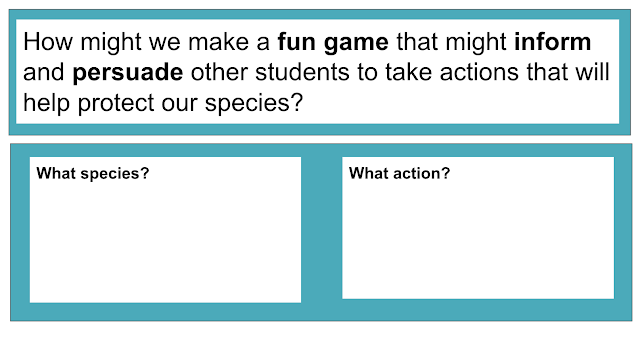
In a recent maker residency,  we offered the following prompt to  guide students into an INQUIRY LEARNING experience connected the EARTH DAY them Protect Our Species.  Students selected an endangered species and used an inquiry framework to complete research on that species. Then we challenged them to use their new micro:bit and coding skills  with the following prompt.


This provided many entry points for students to make something meaningful 
around a curricular theme.
Here are a few videos of students talking about their projects. 


One of the key components to introducing new technology is to use Design Thinking as part of your planning as an educator.  Consider the "humans" you are designing for and their needs.  What are their needs!  Ideate some possibilities!  Then prototype one of your ideas.  A maker residency is one of the ways you might prototype your design as an educator and test the prototype.  Then take the parts that work best and revise the rest. 

And for a peek into the whole design thinking residency we designed check out this video.


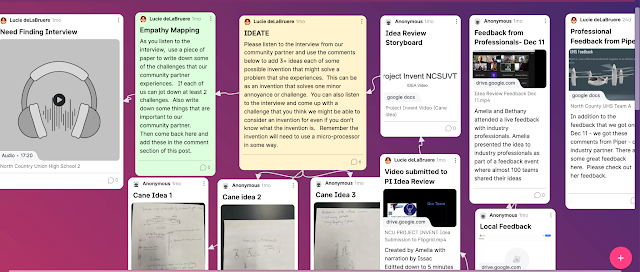
My commitment to Design Thinking lead me to Project Invent where we followed a similar approach with high school students using the micro:bit as our technology tool of choice. 


I love working with educators to design integrated thematic units and would welcome the opportunity to help your teachers think through the process (remotely or in real time) 
Contact me at ldelabruere @ gmail


Monday, November 1, 2021

Halloween Inspired Making Part 2

 As you saw in our last post,  our Halloween station set up outside the bus in Desert Hot Springs, California included a DIY Jack O Lantern as greeter next to the candy bowl.  It was an opportunity to refresh or learn some foundational maker skills. 


Our last post highlighted the design of the pumpkin using  Gravit and the Noun Project. We used the Cricut Maker to cut out some vinyl and cardstock and ended up with a base for our project. 

My goal for part 2 was to spark a maker mindset with a little toy hacking.  A great way to do this is to look around your house for some discarded toys -  but since the bus is pretty minimalist living - I decided to stop in a few nearby dollar stores.  My goal was to find some inexpensive novelty gadget that had LEDs and made sound or vibrated or moved.  

My guess  from the slim pickings is that the current supply chain crisis was at play.  But I did manage to find aa LIGHTUP mouth guard and a few clip on Halloween gadgets to break into.  No sound ;-( No motion  ;-( - but some fun lighting sequences ;-)


So the next step was to crack them open and see what I had to play with. 


hmmm batteries,  some LED lights and a switch


hmmm could I break apart the LED's and extend them further away from the batteries and switch?


ah found a piece of network wire I could use

An opportunity to practice soldering!

I've never been good at soldering, but since my cataract surgery this summer, 
it became even more challenging
They inserted a new lens in my eyes where I can see far ... but 
I can no longer see better when I get close to something


I have an idea


and of course some cardboard


ooooh - I found another blingy thing to hack into at the drug store


Also found a Harbor Freight nearby and picked up a few things including
 some more Alligator Clips for prototyping and 
a Third Hand with a built in LED lighting and magnifying glass 
that helped with soldering


The third hand really helped with soldering 
but I need a LOT more practice 


Eventually I was able to solder a few wires to a small circuit board
that seemed to have a momentary switch on it that 
ran some blinking light patterns for about 20 seconds or so

this allowed us to make really blingy eyes
for our Jack o Lantern
that could  be activated with a paper clip switch 


Not a bad toy hack considering the constraints I was working with. 

But what if I wanted to keep the eyes blinking through the night? 

hmmm perhaps adding a Microbit with some code


The Microbit also  allowed us to add an animated mouth and some music 
I love any excuse to create with code 


and voila  -  

Meet Jack
our Halloween greeter


oh... and I also decided to put some fairy lights I had picked up to good use
for a quick costume change for myself 


while Craig added some colorful solar lights to the bus


Happy Halloween
and 
Happy Learning through Creating and Making